|
Create a Flash Button In FLASH MX | |||||||||||||||||
|
Flash buttons
are a nice addition to an interactive web page. They are simple to produce for designers with Flash experience but some new terms must be mastered. As well a little familiarity with Action Scripts (we will use the normal mode). ******* OPEN A NEW FILE IN ACTION SCRIPT 2 *******
Procedure - design and
produce three buttons that are different in some respect from each other (except
size) and save them for web ( the above buttons are 125 x 50
pixels)
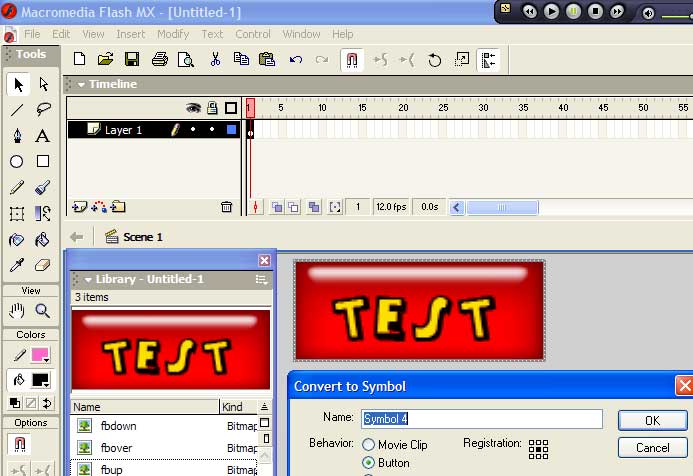
Insert > Convert to Symbol
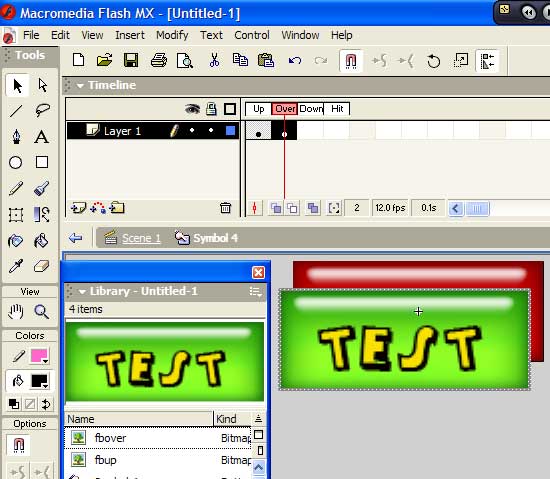
(Button) Create a keyframe
in the OVER frame and place the OVER button on the stage
Click on the blue arrow
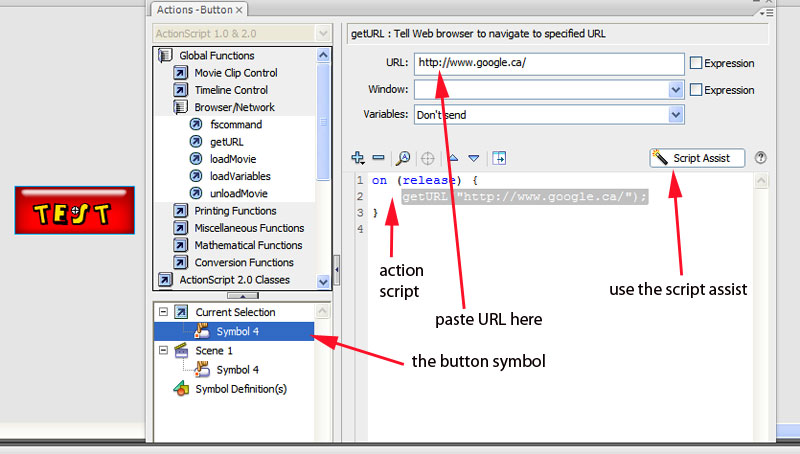
by the paint bucket and you will return from the intertween > click on Browser/Network ---- getURL
Remember to Save As ( this will generate a .fla file ) Now> Publish Preview > Flash (this will create a .swf file) and your button should exhibit 3 states and when the down action is released you should be transported to your hyperlink! Insert > media > flash (the .swf button file into your Dreamweaver production)
YOU CAN CREATE THEM IN FLASH WITH THE DRAW/PENCIL/RECTANGLE/ELLIPTICAL TOOLS CS3 Flash uses a different system with ActionScript 3 its nice
if
Really Want to Create a Flash Website??
|
|||||||||||||||||